Learn how to sync Amazon and Shopify inventory without overselling FBA reserved units. An Amazon...

In this article
You probably have more data than you can sort through. Seller Central reports, the ads console, settlement files and your supplier spreadsheet each describe the same business and show only their own fragment. AI for Amazon sellers promises to pull those fragments into one picture, but the result depends on which data it can access.
The market is full of AI tools for Amazon that read data from your account. They count revenue and fees, while batch cost, freight and supplier lead times stay out of sight. This article compares two approaches: a general-purpose AI connected to Amazon, and NeonPanel agents that work inside your system of record.
Using AI in ecommerce pays off when an insight about a slow SKU changes your next purchase order. We will walk the full path from product analytics to inventory management.
What Your AI Agent Should Do and What Data It Needs
Start with what AI tools for Amazon seller accounts can do on Amazon’s own data. Orders, fees, ads and FBA stock supply the sales data for basic jobs: margin tracking, demand forecasting from sales history, alerts about sudden spikes and first drafts of product listings.
That data has a ceiling. Seller Central holds no record of your unit cost, duties, prep cost or your supplier’s real lead times. AI for Amazon seller accounts that sees only Seller Central will show a margin higher than the real one and give a rough reorder date.
To work at full strength, AI for Amazon seller accounts needs three layers of information:
- Amazon data: orders, fees, advertising, stock levels, settlement files.
- Purchasing and logistics: POs with real unit costs, freight, duties, shipment statuses, stock in AWD and 3PLs. In NeonPanel this layer belongs to agent Nina, who tracks stock and shipments, follows FBA inbound and finds lost batches.
- Finance and planning: batch-level P&L, payout reconciliation, demand forecasts, cash flow. Here you find agent Marta, who handles accounting, and agent Kio, who handles demand forecasting.
Any AI for Amazon sellers answers with the accuracy its data allows. NeonPanel agents work inside the system of record and read the same batches and journal entries your P&L is built on. That is why their answer about margin matches your month-end report.
You keep the decisions AI should not make on its own: supplier negotiations, new product launches, brand voice and the final yes on every order.
AI Analytics for Amazon Product Performance
Amazon shows what sold. What made money becomes visible only after orders are matched with fees, advertising and landed cost. AI analytics for Amazon product performance gathers this data and ranks SKUs by their real contribution to profit. For that it needs the cost of every batch.
A general-purpose AI service will get revenue and fees from Amazon, and everything else has to be uploaded by hand. In NeonPanel, this work belongs to agent Marta, who handles accounting. Every purchase order becomes a batch with its own landed cost, so Marta calculates margin for each SKU down to the batch level.

Profit per SKU After Fees and Ad Spend
Your best seller by revenue can turn out to be your worst by profit. Referral fees, FBA fulfillment fees, storage, returns and PPC take a cut of every unit sold, and a popular product ends up close to zero.
Here is a typical case. Two shipments of the same SKU arrive at different unit costs because freight rates rose between them. A weighted average hides that difference. An Amazon P&L based on FIFO shows which units cost more, and agent Marta pulls this data straight from the ledger, with no exports.
Early Signals of a Declining Listing
Listings rarely fail overnight. Conversion loses half a percent, sessions fall after a competitor launches, the same return reason keeps showing up. Among hundreds of SKUs such a shift is easy to miss, while AI watches every position at once and sends an alert before the dip reaches revenue.
Check the alert against inventory analytics and you see stock levels and inbound shipments right next to it. That leaves enough time to cut the next order or run a promotion. When the cause sits in the listing itself, agent Mark steps in. Mark audits product listings, picks keywords and compares you with competitors.
Pricing and Conversion Patterns
Every price change hits conversion, Buy Box share and ad efficiency at the same time. AI studies weeks of history and estimates how demand reacts to different prices. Pricing optimization becomes a decision you can check: you see whether a one-dollar cut adds profit or only moves more units at a thin margin.
The market side in NeonPanel is handled by agent April, who tracks competitors, prices, trends and BSR and looks for open niches. Marta checks the margin at the new price, so the decision rests on real cost.
How AI for Amazon FBA Plans Restocks
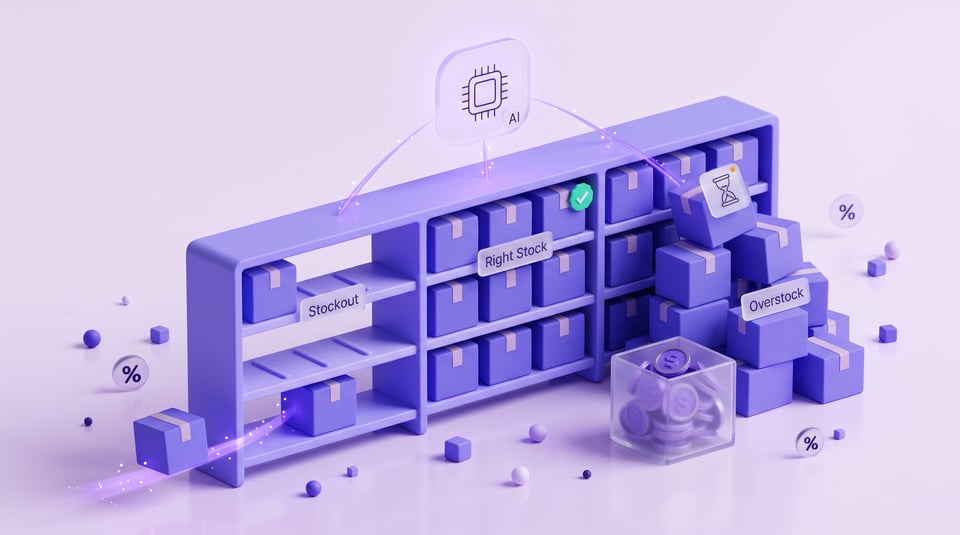
A stockout on FBA costs sales and organic rank, and rank takes weeks to come back. Overstock freezes cash and adds storage fees. AI for Amazon FBA keeps stock levels between these two risks, SKU by SKU, and flags slow movers with low inventory turnover early enough for you to run a clearance before aged-inventory fees start.
Sales Velocity and Seasonality
Every forecast starts with sales velocity. AI measures velocity over several windows, for example 7, 30 and 90 days, to separate a lasting trend from a one-time spike. Then it adds seasonality, past promotions and events like Prime Day. For a new product the model borrows patterns from similar SKUs, so demand forecasting works from the first weeks.
In NeonPanel, forecasts belong to agent Kio. Kio builds several scenarios, compares them and accepts manual adjustments when you know about an upcoming promotion or seasonal peak.
Reorder Points and Supplier Lead Times
Reorder points show the stock level at which the next PO has to go out. For AI for Amazon FBA, the calculation depends on daily sales, production time, freight, Amazon check-in delays and a safety buffer in case the supplier runs late.
Say a SKU sells 20 units a day and the cycle from PO to FBA takes 60 days. By the time you order, you need at least 1,200 units covered, plus a buffer. If the container slips by two weeks, AI moves the order date by itself. Accurate inventory forecasting also counts units in transit and in AWD, so a new order never duplicates stock that is already on its way.
Agent Dorian covers this part in NeonPanel. Dorian prepares recommendations for supplier orders, calculates safety stock and estimates out-of-stock risk, relying on Kio’s forecasts and on Nina’s data about where shipments actually are.
Order size affects cash. Agent Sanjay handles financial planning: Sanjay checks whether cash flow and budget cover the upcoming purchase, using Marta’s data.
How Does Amazon Use AI for Inventory Management
Amazon runs machine learning across its fulfillment network to predict where demand will appear and to place stock closer to buyers. As a seller, you see part of this work in Seller Central:
- the Restock Inventory page suggests order quantities and dates;
- the Inventory Performance Index scores how well your stock matches sales, based on excess units, sell-through, stranded inventory and in-stock rate;
- your FBA capacity limits depend partly on that score;
- generative AI features answer questions about your sales and stock.
This is a solid baseline, but Amazon AI tools for sellers see only Amazon. They do not know your supplier’s real lead time, the units sitting at your 3PL or the Shopify orders drawing from the same stock. They also have no idea what each batch cost you.
That is why inventory management for Amazon has to follow each shipment from supplier PO to FBA with its own arrival date. In NeonPanel, Nina handles this chain: Nina follows FBA inbound, finds lost batches and diagnoses COGS when the numbers diverge.
The short answer to “how does Amazon use AI for inventory management” is this: Amazon optimizes stock inside its own network, while the path from supplier to FBA stays with the seller.
Which AI Tools for Amazon Sellers to Choose
No single tool does everything, and you do not need ten subscriptions. Most brands run on two or three services, each covering one job. Amazon AI tools for sellers are free inside Seller Central, and a small catalog can stay there. Third-party AI tools for Amazon sellers come in when you need cost data, several channels or supplier timelines.
| Tool type | What it solves | Who it fits |
|---|---|---|
| Built-in Seller Central AI | Listing drafts, restock suggestions, quick sales questions | New sellers, single-channel stores |
| General-purpose AI assistants (ChatGPT and similar) | Reading exported reports, drafting text, answering one-off questions | One-time analysis without access to live data |
| Listing and keyword tools | Titles, bullets, keyword research, A+ content | Sellers who launch new ASINs often |
| Repricers | Pricing optimization for the Buy Box within set margin limits | Resellers and wholesale catalogs |
| PPC automation | Bids, budgets, keyword harvesting | Brands with steady ad spend |
| Profit and inventory platforms with AI agents inside | SKU margin, forecasts, purchase orders, bookkeeping. The agents work on the platform’s own data | Brands with landed costs, several warehouses or channels |
Before you pay for AI tools for Amazon seller accounts, ask three questions. Which data sources does it read? Does it include landed cost? Do its numbers match your books at month end? A tool that fails the last check carries the same error into every forecast and margin report.
An agent inside the system of record passes this check on its own, because it calculates from the same entries as your books.
How to Use AI to Sell on Amazon
Most guides on how to use AI to make money on Amazon end with writing listings in a chatbot. The bigger wins sit in margin and stock decisions. Here is the order that works:
- Connect every data source: orders, settlements, ads, stock in FBA, AWD and 3PLs, plus POs with real unit costs. In NeonPanel, agent Neon takes care of connection and data import, and also helps create documents and projects.
- Pick a short set of metrics. Contribution margin per SKU, days of supply, inventory turnover and ad spend as a share of sales cover most daily decisions.
- Test forecasts on a few SKUs. Compare suggested reorder dates with what actually happened over one season, then extend the model to the whole catalog.
- Review once a week. Check margin changes and upcoming reorder points, so supplier delays show up early.
Together these steps give a working answer to how to use AI to sell on Amazon: data first, then metrics, then forecast checks and a weekly review.
Once your data is collected, you can ask questions in plain language. Through an MCP connector, assistants like Claude get access to your sales data in real time. Ask “Which SKUs lost margin this month?” or “What should I reorder next week?” and the answer comes from the ledger, with no CSV export from yesterday involved.
Claude or Slack serve as the window for the question, and NeonPanel agents prepare the answer from a ledger where the data is already reconciled. Each agent covers its own area, and a request goes to whoever handles it. If you are unsure whom to ask, start with agent Neona, the platform concierge. Neona answers questions about the system and the team of agents and hands the work to specialists.
One Ledger for Everything
All NeonPanel agents read one ledger. Sales, inventory and accounting live in it together: every PO becomes a batch with its own landed cost, and every unit sold is matched to the batch it came from. The same records drive your reorder points and days of supply, and Amazon payouts reach QuickBooks or Xero as journal entries.
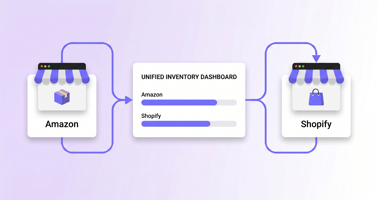
That is why the margin behind your forecast matches the margin in your accountant’s report. Stock in Amazon, Shopify and 3PL warehouses sits on one timeline, and the restock plan accounts for every channel selling the same units. AI analytics for Amazon product performance gets data already reconciled with the books and has no need to rebuild margin from exports.
So the answer to how to use AI to make money on Amazon starts with a ledger you can trust. Using AI in ecommerce pays off when agents work with verified numbers.
FAQ
⌃ Can I use Excel for inventory management?
Yes, if you have a small catalog and one warehouse. Once you add FBA, a 3PL and several suppliers, every update becomes manual and formula errors slip through unnoticed.
⌃ What is ABC analysis in inventory?
It sorts your products into three groups by the value they bring. A items are the few SKUs behind most of your revenue, B items sit in the middle and C items form the long tail. A items need the closest stock control.
⌃ What is a good inventory to sales ratio?
It depends on your category and lead times, so watch the trend. If the ratio grows while sales stay flat, stock is piling up faster than it sells.
⌃ Does Amazon have AI like ChatGPT?
Yes. Shoppers use Rufus, a generative AI assistant in the Amazon app, and AWS offers generative AI services for businesses. Amazon also builds its own Nova models.
⌃ Can ChatGPT analyze Amazon sales data?
It can read exported reports, summarize performance and spot trends. Without fees, unit costs and live stock data, its answers about margin and restocking stay rough. A NeonPanel agent inside the system of record gets this data right away, with no exports.