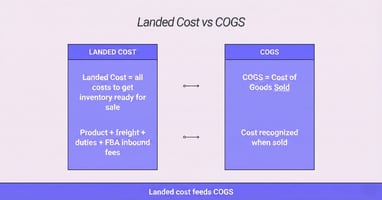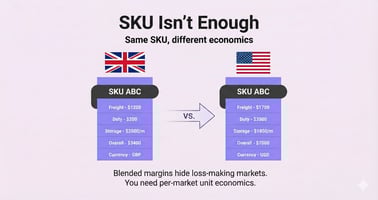

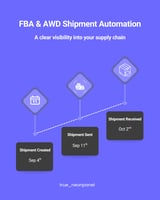
TL;DR: Inbound automation isn’t about manually matching shipment plans to POs or tying individual...
TL;DR: For most Amazon and e-commerce brands, inventory doesn’t appear overnight. You pay deposits, wait through production, watch containers sail, clear customs, and only then see sellable stock. Finance leaders need a clear answer to one basic question: at which point does this pipeline become an inventory asset on the balance sheet?
NeonPanel lets you choose that point—deposit, manufacturing complete, or arrival in country—and then operationalizes it so every PO, shipment, and journal entry follows the same algorithm. Finance Directors, Chief Accountants, and Owners get control over policy and confidence that it’s applied consistently.
Why inventory recognition timing actually matters
The moment you start treating spend as “inventory” instead of “prepayment” or “expense” changes:
-
Total assets and working capital
-
Debt covenants and lending capacity
-
Reported COGS and gross margin (when the inventory eventually sells)
-
How investors and buyers read your balance sheet
Two brands with identical operations can show very different numbers simply because they recognize inventory at different stages of the supply chain. That’s fine—if the policy is deliberate, documented, and applied consistently.
The problem in many businesses is not the policy itself; it’s that:
-
Logistics and finance teams track different “truths.”
-
Recognition rules live in spreadsheets and people’s heads.
-
Adjustments get made ad hoc at month-end to “fix” mismatches.
You want a world where the system knows your policy and enforces it for every shipment.
Three common points to recognize inventory
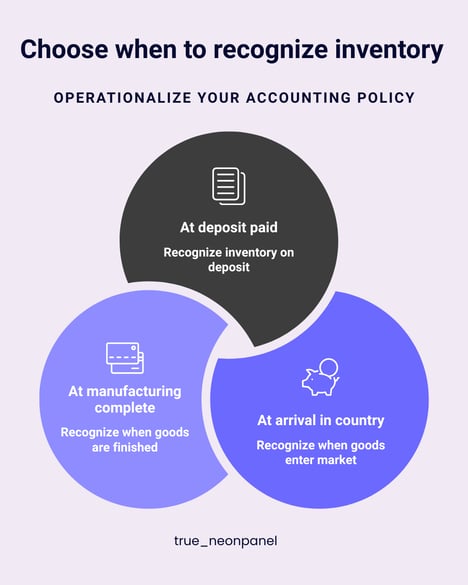
There is no one right answer for every brand. In practice, most e-commerce accounting policies choose one of three recognition points for inventory assets.
1. At deposit paid
What it means
The moment you pay a deposit (say 30%) on a purchase order, you recognize that amount as inventory (often in an “In Production” or “In Transit” warehouse).
Pros
-
Reflects committed stock early, which can be useful if lead times are long.
-
Shows more of your capital tied up in inventory instead of sitting in generic prepayments.
Cons
-
Production risk still exists—goods might not be finished or might differ from spec.
-
From a strict accounting view, some teams prefer to treat deposits as prepayments until they control the goods.
This approach can make sense for brands with very reliable suppliers and long, predictable cycles.
2. At manufacturing complete
What it means
You treat payments as prepayments while the goods are being produced. Once the manufacturer confirms completion (or issues the final invoice) and the batch passes final checks, you recognize the full amount as inventory—even if the container has not yet left the factory.
Pros
-
Better alignment with the idea that inventory is an asset once it exists in a finished, sellable form.
-
Reduces the period where you show large prepayment balances on the balance sheet.
Cons
-
You still don’t physically control the goods; damage or loss in transit is possible.
-
Requires clean data from suppliers about when production is actually complete.
This option is a common compromise between conservatism and practicality.
3. At arrival in country (or at inbound warehouse)
What it means
You treat all spend as prepayments until goods arrive in your destination country (often when they clear customs or land in your 3PL / AWD). Only then do you recognize inventory.
Pros
-
Strong alignment with the idea of “control” under many accounting frameworks.
-
Clear, auditable moment: customs cleared / GRN received / FBA or AWD checked in.
Cons
-
Inventory and working capital look lower while large amounts are still on the water.
-
For brands with long transit times, this can make the balance sheet look “light” compared to the commercial reality.
This is often chosen by more conservative Finance Directors or when lenders care heavily about physical control.
The real goal: pick a policy and apply it consistently
From an investor or lender’s perspective, consistency is more important than which of these three you choose. A clear policy means:
-
They can compare year on year without hidden shifts.
-
Quality-of-earnings reviews won’t uncover surprises.
-
You can explain working-capital swings with reference to operations, not bookkeeping quirks.
Operationally, that means your tools must:
-
Track inventory across different states (ordered, in production, in transit, in country, on-hand, reserved).
-
Know which state triggers a balance-sheet recognition event for your policy.
-
Automatically create the right journal entries and sync them to QuickBooks or Xero.
That’s exactly what “operationalizing your accounting policy” means.
How NeonPanel turns policy into an algorithm
NeonPanel is designed so Finance can define the rules while Operations just follows their normal process.
1. Map your supply chain stages
In NeonPanel you already see inventory split by:
-
On-hand
-
In-transit
-
Reserved / allocated
-
FBA / AWD shipments and statuses (sent, received, in transfer)
Behind the scenes, each of those states can be associated with different virtual warehouses or locations (e.g., “In Production – Supplier,” “On Water,” “Inbound DC,” “FBA UK”).
2. Choose your recognition trigger
Working with your CPA, you decide when inventory should start showing as an asset. For example:
-
Deposit policy:
-
When a deposit is paid on a PO, NeonPanel records inventory in an “In Production” warehouse and posts the corresponding inventory asset journal to your accounting system.
-
-
Manufacturing complete policy:
-
Until completion, deposits sit in a vendor prepayment account.
-
When the PO or batch is flagged as “Manufacturing complete,” NeonPanel moves the balance from prepayments into inventory and updates batch costs.
-
-
Arrival in country policy:
-
Deposits and progress payments stay as prepayments.
-
Only when the shipment is marked “Arrived / Received” at the inbound warehouse (or FBA/AWD) does NeonPanel convert those prepayments into inventory and push the asset journal.
-
Because the underlying engine already knows where each batch is and what it costs, switching recognition logic is a matter of configuration, not re-architecting your ops.
3. Let the rule-based journal engine do the heavy lifting
NeonPanel’s accounting automation is built around rules rather than one-off mappings:
-
You define which accounts should be hit when a batch changes state (e.g., Prepayments → Inventory → COGS).
-
Those rules are applied systematically to every PO, shipment, and sale.
-
Journals are pushed to QuickBooks Online or Xero in real time, so the finance team is always working off up-to-date numbers.
For Finance Directors, this means you can enforce your policy once and trust that operations cannot accidentally break it with a manual spreadsheet workaround.
What this unlocks for Finance Directors and Owners
When your inventory recognition policy lives inside NeonPanel rather than in a slide deck, you get:
-
Cleaner, more predictable balance sheets
-
Inventory and prepayment balances move exactly when and how you defined.
-
-
Faster closes with fewer adjustments
-
You no longer need to reclassify big chunks of “Deposits” to “Inventory” manually each period.
-
-
Stronger story for lenders and buyers
-
You can show not only your policy, but also the system that enforces it—plus full batch-level audit trails and reconciliations.
-
-
Flexibility as your business evolves
-
If you later decide to change policy (for example when moving from founder-led books to audited financials), you can adjust settings and recalculate downstream journals without remodeling everything in Excel.
-
In other words, you get the control of an enterprise ERP without sacrificing the speed and practicality that high-growth e-commerce teams need.
Putting it into practice
If you are a Finance Director, Chief Accountant, or Owner, a good starting checklist is:
-
Document your desired policy
-
Deposit vs. completion vs. arrival.
-
How you want to treat in-transit vs. on-hand stock.
-
-
Align with your CPA and lenders
-
Confirm that the policy is acceptable under your reporting framework and covenants.
-
-
Configure NeonPanel
-
Map supply-chain stages to virtual warehouses and statuses.
-
Define journal rules for each state change.
-
-
Test on a few historical shipments
-
Run through prior POs to confirm that the balance sheet and P&L look as expected.
-
-
Go live and lock in consistency
-
From that point on, every new shipment follows the same algorithm.
-
When your accounting policy is just words on paper, it’s easy for reality to drift. When it’s wired into your inventory and accounting platform, you get numbers you can actually stand behind.
NeonPanel’s job is to make that wiring straightforward, so your books match the way you want to run your business.