
.png?height=200&name=Accounting%20Matters%20(EBITDA).png)
TL;DR: Most Amazon brands expense FBA inbound fees as operating costs. That pushes EBITDA down and...
TL;DR: Inbound automation isn’t about manually matching shipment plans to POs or tying individual shipments to orders. NeonPanel lets you create/import purchase orders, ingest FBA/AWD and 3PL shipments, and attach landed-cost bills. Behind the scenes, NeonPanel automatically assigns receipts to open POs using FIFO logic and builds cost layers per SKU and location. When orders later sync in from Amazon and other channels, inventory and COGS update automatically—no matching, no spreadsheets.
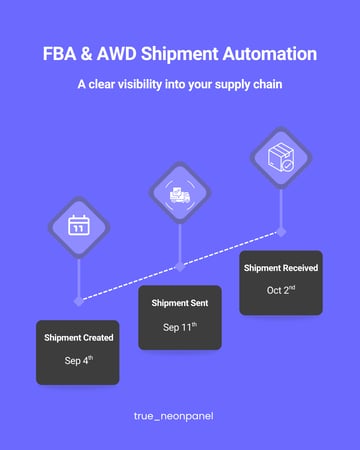
Why inbound automation matters in the first place
For FBA and AWD-heavy brands, a lot of capital lives in the inbound pipeline:
-
Deposits and balances paid to suppliers
-
Containers on the water
-
Goods sitting at AWD or a 3PL waiting to move into FBA
-
Stock that is checked in by Amazon but not yet visible in your own reporting
Without a clear system, teams end up with:
-
POs in one place, shipment plans in another, freight bills in email
-
A balance sheet full of vague prepayments and “inventory” numbers no one fully trusts
-
Month-end closes that involve reconstructing what actually arrived where
Inbound automation is about turning that pipeline into clean, ready-to-sell inventory automatically, instead of reconciling it by hand every month.
What inbound automation means in NeonPanel
In NeonPanel, the inbound story is:
-
You manage intent through purchase orders.
POs define what you decided to buy: SKUs, quantities, and vendor terms. -
You connect your Amazon account(s), AWD, and (optionally) 3PL feeds.
NeonPanel pulls in FBA and AWD shipment data and receipts automatically. -
You attach landed-cost bills to POs and/or shipments.
Freight, duty, brokerage, insurance, labeling, and handling are added once. -
NeonPanel automatically matches receipts to open POs using FIFO logic.
You do not assign individual FBA shipments to POs. The system allocates received units to the oldest open PO lines for that SKU and location, building cost layers in the background. -
Those layers later drive COGS when orders sync in.
Orders from Amazon, Shopify, TikTok, etc. simply consume inventory from the right FIFO layer; you don’t link orders to shipments either.
The key idea: you control the policy and inputs; NeonPanel handles all the matching.
The clean 4-step flow for inbound inventory
1. Create or import purchase orders
You start with POs:
-
Define SKUs, quantities, costs, and expected dates.
-
Keep POs as the single source of truth for “what we intended to buy.”
NeonPanel can import POs from your existing systems or help you create them directly in the app.
2. NeonPanel ingests shipments and receipts automatically
Once your Amazon account and (optionally) AWD and 3PL data sources are connected:
-
FBA shipment plans, inbound shipments, and check-in events flow into NeonPanel.
-
AWD receipts and transfers are pulled in as they happen.
-
3PL receipts (where integrated) appear as inbound events as well.
You do not tell NeonPanel “this shipment belongs to that PO.”
Instead, NeonPanel automatically:
-
Matches receipts to open POs by SKU using FIFO logic
-
Allocates quantities to the oldest remaining PO lines first
-
Creates cost layers per SKU and location as inventory is confirmed received
3. Attach landed-cost bills once
Next, you attach inbound cost invoices:
-
Freight and drayage
-
Duties, customs brokerage, and import VAT (where appropriate)
-
Insurance
-
Handling, labeling, and other inbound charges
You decide how to allocate these (units, weight, volume, or value). NeonPanel applies that approach consistently across the POs and receipts involved.
When new landed-cost bills are added, NeonPanel updates the relevant cost layers automatically—no need to go back and re-match shipments.
4. Review exceptions; NeonPanel handles the rest
Most of the time, the flow above can run on autopilot. Where you step in is when something looks off:
-
Shorts and overs
Quickly see POs where receipts don’t match expected quantities. -
Unmatched receipts
Identify inbound events that don’t have an obvious PO (e.g., a SKU that wasn’t on any open PO). -
Missing costs
Spot shipments that landed without freight/duty attached yet, so you can chase the invoices.
Once those exceptions are resolved, NeonPanel’s inventory view and your accounting system have the same story:
-
How many units you have
-
Where they are (3PL, AWD, FBA, etc.)
-
What they cost per batch
When orders come in, inventory is relieved and COGS posts automatically based on those layers—but that’s the output of clean inbounds, not something you manage shipment-by-shipment.
Controls that keep ops and finance aligned
Because matching happens automatically, good controls are essential. NeonPanel builds them in:
-
Expected vs. received views
See, per PO and SKU, what was ordered vs. what has been received through FBA/AWD/3PL so far. -
Lifecycle visibility
Track inventory as it moves from “on the way” to “at AWD” to “at FBA” to “available for sale,” without manually re-keying statuses. -
Period locks and audit trail
After close, cost layers can be locked, and any corrections show up as explicit adjustments in the next period—no silent rewrites. -
Identifier checks
FNSKU/ASIN/SKU mismatches are highlighted so you can fix catalog issues before they turn into ghost inventory.
The goal is that finance can trust the numbers and operations can trust the quantities, without having to reconcile separate versions of reality.
Edge cases, without spreadsheet gymnastics
Inbound flows are rarely perfect. NeonPanel’s automatic matching and layering handles the common “messy” scenarios:
-
Split shipments and multiple FCs
Several FBA shipments against the same PO? NeonPanel simply treats each receipt as a partial fill for the oldest open lines. -
AWD storage and transfers
Movements between AWD nodes or from AWD to FBA move the existing cost layers with them; they do not create COGS events. -
Damaged or scrapped units
Adjustments reduce the relevant cost layers and post the correct expense, without you figuring out which shipment the units came from. -
Over-receipts on a SKU
Extra units just become a new layer. NeonPanel doesn’t distort the cost of the original shipment.
All of this happens without requiring you to maintain a complex “shipment → PO → order” matrix.
Inbound automation is about turning your purchase orders and shipment feeds into accurate, ready-to-sell inventory automatically, so that all downstream numbers—COGS, margins, and valuations—are built on a solid base.
How NeonPanel changes your day-to-day
Once this is set up, your team’s day-to-day shifts from “manual matching” to “policy and exceptions”:
-
Ops and purchasing focus on POs and shipments.
-
Finance defines allocation rules, account mappings, and recognition policy once.
-
NeonPanel automatically ties it together and surfaces only what needs human review.
No one is matching shipments to POs in a spreadsheet, and no one is trying to reconcile FBA inventory reports against a separate PO tracker at month-end.
That’s what we mean by automating FBA & AWD inbounds—from purchase order to ready-to-sell inventory, with no manual matching required.