
In this article
- What Is the Amazon FBA Process?
- Amazon FBA Registration Process Explained
- Amazon FBA Process Step by Step
- Amazon FBA Shipment Process & Receiving Timeline
- What Does FC Processing Mean in Amazon FBA?
- Amazon FBA Processing Time: How Long Does It Take?
- Amazon FBA Fees: Manual Processing Fee & Returns Processing Fee
- Common Issues in the FBA Amazon Process
- Operational Timeline Breakdown
- Inventory Control Strategy
- Conclusion
- FAQ
What Is the Amazon FBA Process?
The Amazon FBA process is a structured inbound-to-fulfillment workflow. It covers seller onboarding, shipment preparation, warehouse receiving, internal handling, and post-sale returns.
The process of Amazon FBA includes:
- Account activation
- Listing configuration
- Creating an FBA shipment plan
- Inbound transportation
- Inventory check-in
- FBA FC processing
- Order fulfillment
- Returns reconciliation
The FBA process Amazon operates as a chain. When one stage slows, the rest of the timeline shifts. Understanding the full operational flow prevents inventory gaps and protects sales velocity.
Amazon FBA Registration Process Explained
The Amazon FBA registration process is the administrative gateway. The FBA registration process typically includes:
- Professional seller account creation
- Identity and tax validation
- Banking confirmation
- Restricted category approval
Approval timing depends on compliance accuracy. Registration activates infrastructure. Execution begins once listings are converted to Fulfillment by Amazon and inbound shipments are created.
Most operational risk begins after onboarding — not during registration.
Amazon FBA Process Step by Step
Here is the Amazon FBA process step by step with operational clarity:
- Create or convert listing to FBA
- Build the FBA shipment plan
- Enter carton content details
- Apply required labels
- Ship inventory to assigned facilities
- Inventory check-in
- FBA FC processing
- Inventory becomes active
These are the official Amazon FBA process steps. However, the real FBA Amazon process includes additional quality control layers:
- Barcode validation
- Carton reconciliation
- Routing allocation
- System indexing
Minor prep mistakes extend handling cycles and may trigger a FBA manual processing fee. Precision at the shipment stage reduces FBA shipment processing time downstream.
Amazon FBA Shipment Process & Receiving Timeline
The FBA shipment process does not conclude at delivery confirmation. After delivery, the Amazon FBA receiving process begins.
Inbound workflow typically follows this structure:
- Stage 1: Dock intake. Cartons are unloaded and staged.
- Stage 2: Scan verification. Barcodes are scanned and shipment status updates begin.
- Stage 3: Inventory check-in. Units are reconciled against shipment data.
- Stage 4: Internal allocation. Inventory is assigned to storage zones.
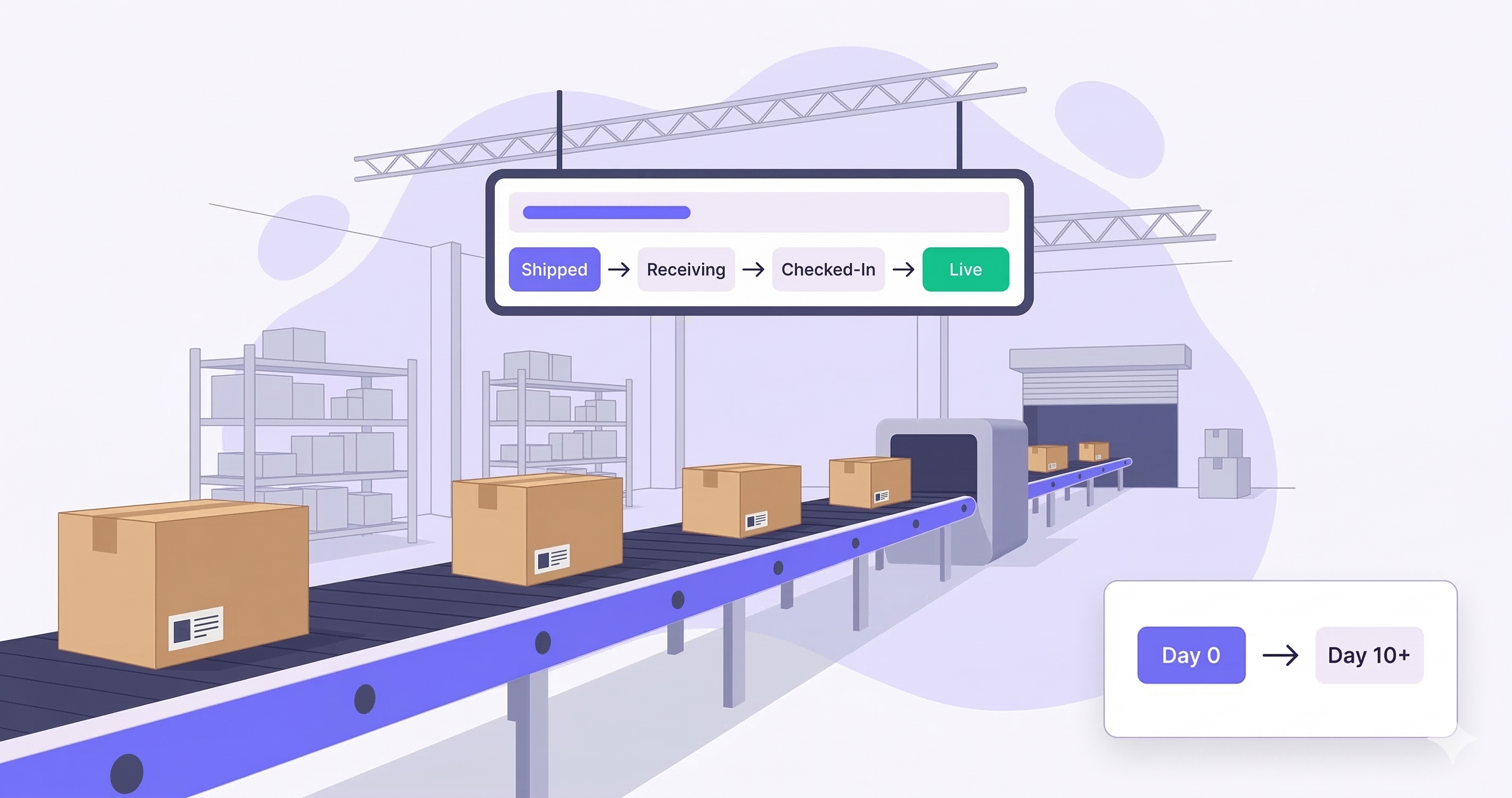
Shipment status usually progresses through: Shipped → Delivered → Receiving → Checked-In.
Delivery confirmation only marks the physical arrival — inventory availability depends on the completion of internal workflows. Inventory in Receiving is non-sellable, which can impact rankings and ad performance.
During peak periods, inbound queues can lengthen, increasing variability in Amazon FBA shipment processing. Daily monitoring of receiving status is essential for operational control.
What Does FC Processing Mean in Amazon FBA?
Many sellers wonder what FC processing means in Amazon FBA. FC stands for Fulfillment Center. FBA FC processing refers to internal warehouse handling that takes place after inventory check-in:
- Sorting by SKU
- Inspection for damage
- Routing across zones
- Bin placement
- System indexing
This stage determines when inventory becomes available. Delays inside FBA FC processing may result from:
- Seasonal congestion
- Redistribution to other facilities
- Compliance reviews
This internal phase is a major contributor to overall Amazon FBA processing time.
Amazon FBA Processing Time: How Long Does It Take?
Typical inbound handling by stage:
- 1–4 days: Receiving and inventory check-in
- 2–7 days: FC processing
FBA processing time is not fixed. It depends on:
- Fulfillment center workload
- Regional routing
- Compliance accuracy
- Seasonality
During Q4, Amazon FBA processing time can extend significantly. Operators should track historical averages and include buffer days in their restock planning. Forecasting must also account for inbound variability when determining how long it takes Amazon to process FBA.
Amazon FBA Fees: Manual Processing Fee & Returns Processing Fee
FBA Manual Processing Fee
The FBA manual processing fee applies when warehouse staff must correct:
- Missing labels
- Improper packing
- Incorrect barcodes
- Shipment data mismatches
Manual correction increases cost and extends the timeline. Compliance accuracy preserves margin and improves shipment status progression.
FBA Returns Processing Fee
The FBA returns processing fee applies when certain categories incur return handling charges. Returns handling includes:
- Inspection
- Repackaging
- Disposal when necessary
Returns must be factored into inbound planning and inventory turnover models. They are part of the ongoing FBA Amazon process, not an isolated cost.
Common Issues in the FBA Amazon Process
Operational friction commonly appears in the Amazon FBA process due to:
- Incorrect FBA shipment plan configuration
- Carton quantity mismatches
- Missing compliance labels
- Extended receiving status
- Inventory redistribution delays
If shipment status remains in Receiving, working capital remains locked. Peak season amplifies inbound congestion. Operational control requires:
- Monitoring shipment status daily
- Auditing discrepancies immediately
- Tracking historical FBA processing time
- Planning inbound shipments with lead-time buffers
The FBA process Amazon rewards disciplined logistics execution.
Operational Timeline Breakdown
To reduce inbound uncertainty, consider this practical timeline model:
- Day 0–2: Carrier transit
- Day 3: Delivered, awaiting dock intake
- Day 4–6: Inventory check-in
- Day 6–10: FC handling and indexing
- Day 10+: Inventory live
During peak periods, each stage may extend by 2–5 additional days. This variability explains why how long it takes to process an FBA shipment after it is delivered has no fixed answer. Buffer planning stabilises sellable inventory levels.
Inventory Control Strategy
Inbound variability directly impacts stock forecasting. To reduce disruption:
- Track average FBA shipment processing time by region
- Monitor shipment status movement speed
- Compare planned arrival vs. live availability
- Adjust reorder timing based on historical inbound lag
Understanding the full inbound lifecycle improves cash flow control.
Conclusion
The complete Amazon FBA process extends far beyond registration. It includes:
Registration → Shipment planning → Receiving → FC handling → Availability → Returns.
Understanding the entire process of Amazon FBA enables sellers to:
- Forecast realistic inbound timelines
- Reduce manual intervention costs
- Minimise exposure to inbound variance
- Protect inventory availability
Execution discipline reduces delays. Operational awareness reduces surprises. Control over inbound timing is a competitive advantage.